Verify contract ownership
Each contract on your profile must be verified before it counts toward your Builder Score. There are four methods; use deployer verification when you can, since it's the only one you can self-register on-chain. The other three are added by Sky Mavis after review.
Methods at a glance
| Method | Who signs | Self-register on-chain | When to use |
|---|---|---|---|
| Deployer | The EOA that deployed the contract | Yes | Default. Always try this first. |
| Owner | The Owner of an Ownable contract | No, requires Sky Mavis review | Use when the deployer key is lost but the contract is Ownable and you control the Owner. |
| Access-control | An address holding any AccessControl role | No, requires Sky Mavis review | Use when the contract uses OpenZeppelin AccessControl and you hold an admin role. |
| Safe (multisig) | A Gnosis Safe that is the owner or the deployer | No, requires Sky Mavis review | Use when ownership lives in a multisig. The Safe itself signs via on-chain ERC-1271. |
Where to verify
Verification happens on the /verify page, reachable from the
share link in the Contracts panel. If the wallet that holds the
deployer key, owner, or role lives elsewhere, send the share link to
whoever holds the key; it authorizes verification submissions for your
profile and nothing else.
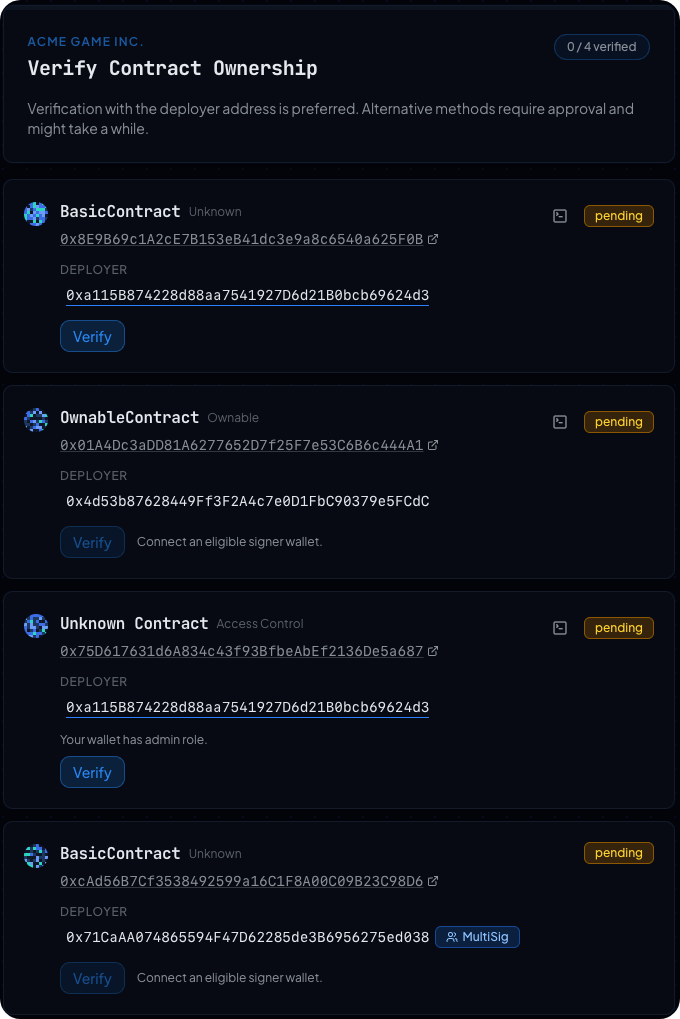
Each card shows the deployer address recovered on-chain, any Alternative
Methods (Owner, AccessControl role holders, Safe), a primary Verify
button, a secondary Verify manually link for the cast wallet sign
flow, and a status badge that flips from pending to verified once a
signature is accepted.
Method 1. Deployer verification (preferred)
When the deployer signs, the portal can register that contract for you on-chain in the same transaction that activates your profile. If the deployer is a contract (factory, multisig, another contract), deployer verification doesn't apply; use owner, access-control, or Safe instead.
Sub-method A. Browser wallet
Connect the wallet that holds the deployer key, click Verify, and sign
the request. The card flips to verified.
Sub-method B. cast wallet sign (manual signature)
Use this when the deployer key lives in a CI secret, on a hardware
wallet, or anywhere you can't connect to a browser. The cast
command-line tool ships as part of Foundry.
- On the contract card, click
Verify manually. Copy thecast wallet sign --data '...' --interactivecommand shown in the dialog. - Run the command on a machine that can access the deployer key. Cast
prints a
0x-prefixed signature. - Paste the signature into the dialog and click
Submit verification. The card flips toverified.
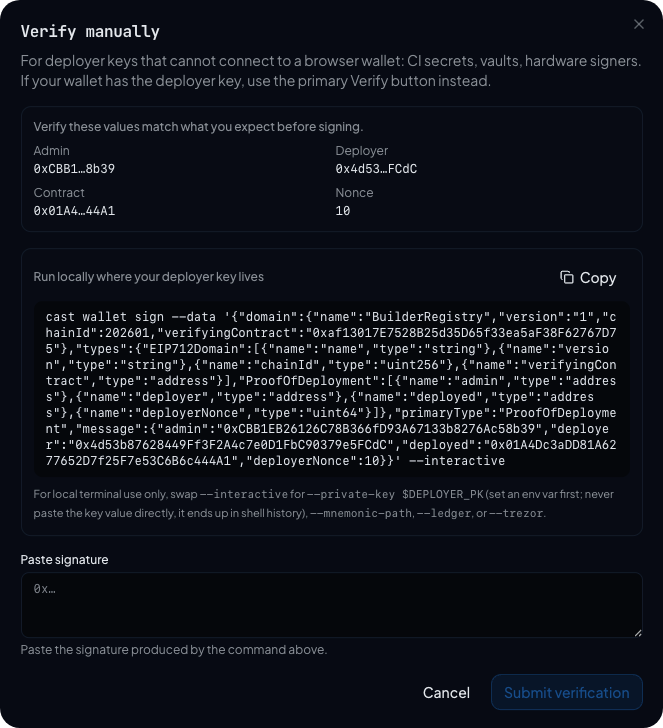
The dialog asks for a signature, not a key. A raw private key is 64
hex characters; a valid signature is 130 hex characters after the 0x
prefix. Keys go to cast, signatures go to the page.
Methods 2-4. Alternative verifications
Methods 2-4 (Owner, AccessControl, Safe) all follow the same shape: the
relevant address surfaces on the contract card under Alternative
Methods, you connect a wallet that controls that address, click
Verify, and sign. Verifications stack: re-verifying the same
contract by deployer later replaces the alternative path.
The signatures from these three methods aren't self-registerable
on-chain. Sky Mavis adds these contracts to your tracking list after
review; the dashboard shows them under Ready to register with an
Awaiting registration status until that happens.
Method 2. Owner verification
If the contract implements OpenZeppelin's Ownable interface (or
equivalent), the Owner address can sign for verification.
Method 3. Access-control verification
If the contract uses OpenZeppelin's AccessControl, any address
holding any role (including DEFAULT_ADMIN_ROLE and custom roles the
portal detects from events) can sign. If the analyzer can't enumerate
role holders, the card shows an amber notice and falls back to
checking on-chain at submission time.
Method 4. Safe (multisig) verification
If the deployer or owner is a Gnosis Safe, the Safe signs via ERC-1271. Connect a Safe signer; the portal walks you through proposing a transaction inside the Safe that signs the verification message. Once the Safe's threshold is met, the portal picks up the signature and marks the contract verified.
What if none of these work?
Contact Sky Mavis in the Builders channel of the
Ronin Discord. Manually verified
contracts display a Verified by Sky Mavis badge and behave
identically to other Sky-Mavis-registered contracts.
What "verified" means in the dashboard
- The contract card shows a
verifiedstatus badge. Sky-Mavis-verified contracts additionally show a Verified by Sky Mavis label. - The Contracts tab moves the card to
Ready to register(if you've activated) or to the activation list (if you haven't). - On the activation dialog, deployer-verified contracts appear under Registers now; the others appear under Sky Mavis registers later.
See also
- Activate on-chain
- Manage contracts
- Verify a smart contract on Sourcify (a separate source-code-level verification; complements PoD verification but is not required for it).